
Check the facts behind a personalized answer
Does remembering more make your AI more accurate?
Two authors describe stale facts and assumptions added to memory. Compare what the AI says with what happened, then locate the relevant account controls.
Before counting how much an AI remembers, check what it assumes is true about you. A tool you only researched can become one it says you use; an old team size can become the present-day answer.
Two authors’ experiences suggest how to look for outdated facts and added assumptions. These are reported experiences, not experiments reproduced by INFLFEED. Screenshots preserve the originals; Yun’s post is Korean and Gewirtz’s article is English.
A fact can have been true and still be wrong today
Yun Jadong says he used 299 video transcripts and Threads posts to make an AI resembling himself. Asked about employee count, it answered eight on one occasion and six on another. He explains that both numbers had been correct at different times.
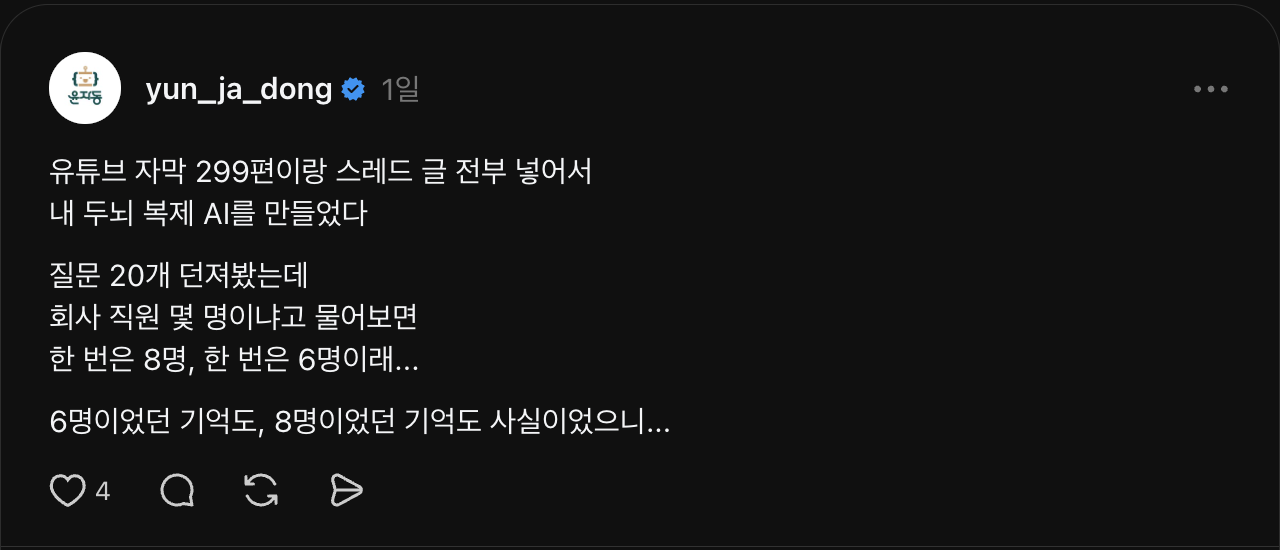

The useful distinction is between historical and current facts. Team size, project ownership and tools in use can change. Remembering information does not establish that it is current. The post does not provide a reproduced test of the input material or the cause of the error.
If your AI keeps naming an old schedule or owner, ask which dated record supports the answer.
 Short post · employee counts of eight and sixRead original Meet the creatorYun JadongTeaches AI-assisted repetitive work, including setup, record keeping, review and training preparation.Read creator guide
What if the AI says you did something you never did?
David Gewirtz’s ZDNET article compares what he actually did with assumptions ChatGPT added. Start with the Kasa question and answer, then the saved-memory list in “A trip down Memory Lane.”
He asked about Kasa smart plugs he had previously installed. The answer also claimed he had moved his monitoring setup to Home Assistant. He says he had never installed Home Assistant and that the plugs were in storage. Knowing of a related tool is different from having used it.
Compare the answer with the saved memory
The older memory list he shares contains a short entry about installing Kasa plugs. Compare that entry with his account of the answer to see what the response added.


Apply the same question to researching a destination, considering a career move or asking how to install a tool. Does the answer distinguish a topic you asked about from something you actually did?
The article reports one author’s experiences and concerns. It does not show the same error disappearing in a fresh conversation after correction. Read it as a way to spot a problem, not as a verified remedy. Focus on the disclosed answer and memory list rather than company performance figures mentioned elsewhere in the article.
 Kasa question and A trip down Memory LaneRead original Meet the creatorDavid GewirtzWrites about hands-on AI and software experiences at ZDNET.This account compares a received answer with his actual circumstances.View author profile
What should you check in your own account?
Choose one fact whose present state you know: a tool you stopped using or a project you only considered. Ask what the AI knows about it and check whether it separates research from action. If it supplies a source, read that source too.
For ChatGPT, consult OpenAI’s official memory guide for the current controls. Keep three issues separate:
- A visible summary is not necessarily complete. The guide explains that the memory summary does not exhaustively list every piece of information and source used. A Sources display may help identify personal information used in an answer without exposing every contributing factor.
- Correction and reduced mention are different. Available accounts may edit a memory summary or saved memories. “Don’t mention this again” reduces future mention; it is not the same operation as deleting the source conversation or file.
- The original may still exist. Deleting a conversation can leave a separately saved memory, and deleting a memory does not erase earlier conversation text. Check the relevant conversations, files and connected sources and the service’s controls for each.
Controls vary by plan, region, platform and workspace. Other AI services have their own current guidance. This article did not test accuracy improvements or complete deletion.
Start with the short account to recognize the problem, the longer account to inspect added assumptions, or the official guide to locate controls. Then read how to set boundaries when delegating work to AI: supplying context and checking what happened are related but separate tasks.