
Choose a first coding exercise
Three videos for your first day of coding
Create a file with OpenTutorials, sample Lefty Kim’s Python teaching style, or compare code and output with Dongbin Na. Start with the task you want to try.
To make your first file and see it work, start with OpenTutorials. If Python feels intimidating, try Lefty Kim’s course introduction. To compare code with its output, jump to Dongbin Na’s string-printing example.
| Creator · subscribers | First task | What you need · where to start |
|---|---|---|
| OpenTutorials · about 340K | Open an HTML file in a browser | Computer, browser, editor · 02:54–05:15 |
| Lefty Kim · about 52.8K | Decide whether the Python course suits you | No installation to watch · 1:27 total |
| Dongbin Na · about 163K | Compare a string with its printed output | Computer and Python to practice · 16:32–17:25 |
Basis: first tasks, prerequisites and displayed subscriber counts, checked on YouTube on November 1, 2026. These are Korean-language videos; English captions have not been verified.
OpenTutorials — make your first file
If you would rather see a small result than spend another hour choosing a course, watch this roughly five-minute HTML setup lesson. In an editor, the instructor creates 1.html, types Hello world, saves the file and opens it in a browser. The same sentence appears on the page.
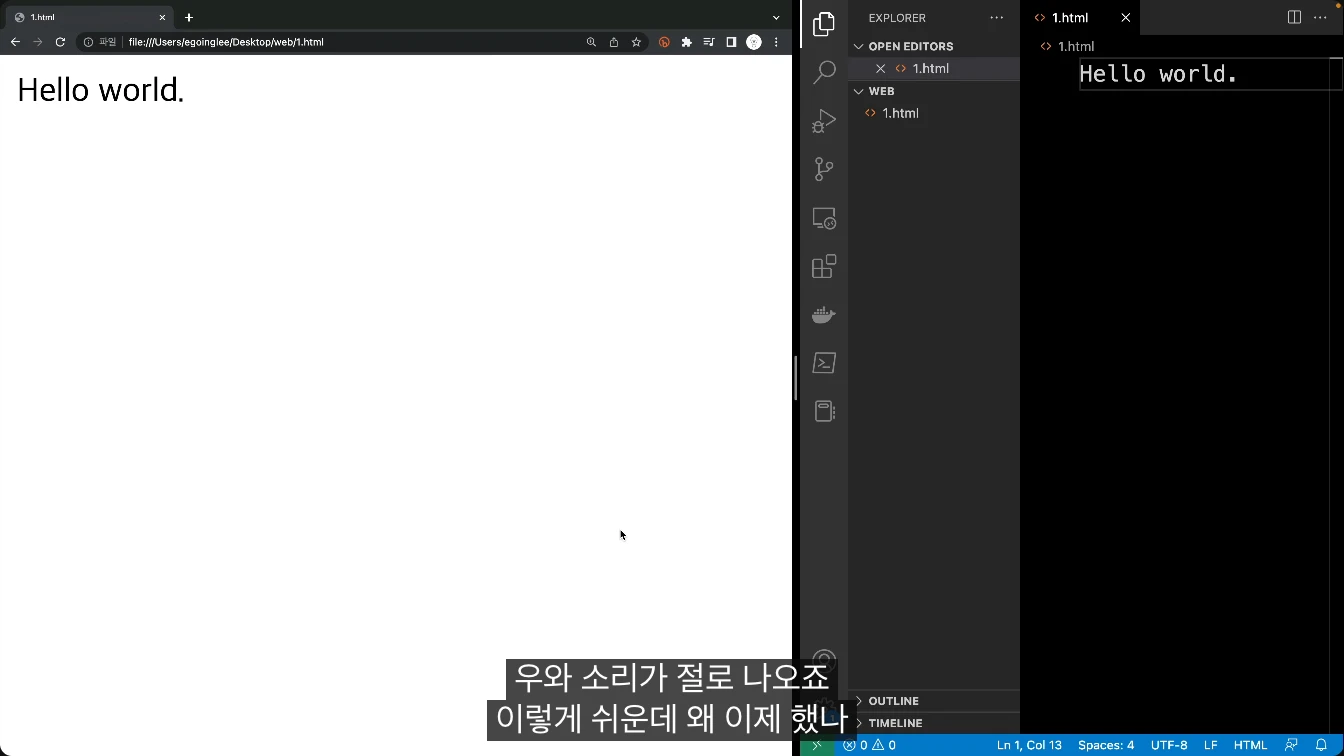
Start at the beginning if you need the browser and VS Code setup. If those are ready, begin making the file at 02:54. The goal is to open one file on your own computer. Publishing a website online and learning HTML tags come later. This is the 2023 revised lesson, so today’s installation screens may differ.
 02:54–05:15 · creating and opening a fileWatch segment Meet the creatorOpenTutorialsShows how to create a file in an editor and open it in a browser.A useful starting point if you want to see a small result immediately.Read creator guide
Lefty Kim — decide whether to give Python another try
If you have wondered why Python feels hard when everyone calls it easy, listen to this 1-minute-27-second introduction. Lefty Kim begins by acknowledging that a language can be relatively easy and still be difficult for a first-time learner. At 00:25–00:58, he describes a course for complete beginners and people who have given up several times.
Published in 2018, this is a course introduction, with no installation or coding exercise. Use it to hear the instructor’s style and decide whether to continue. Later, he explains that the course uses a book and that some projects and exercises are in it. If you want to type code immediately, the next example is a closer match.
 00:03–00:58 · introduction; 1:27 totalWatch segment Meet the creatorLefty KimAcknowledges how daunting programming can feel to a beginner.This short introduction lets you hear the teaching style before committing to practice.Read creator guide
Dongbin Na — compare Python code with its output
Once you have decided to try Python, watch 16:32–17:25. Dongbin Na writes strings in quotation marks and displays them with print. Compare the sentence in the code with the sentence in the output panel. The full lesson is about 90 minutes; you do not need to finish it on day one.
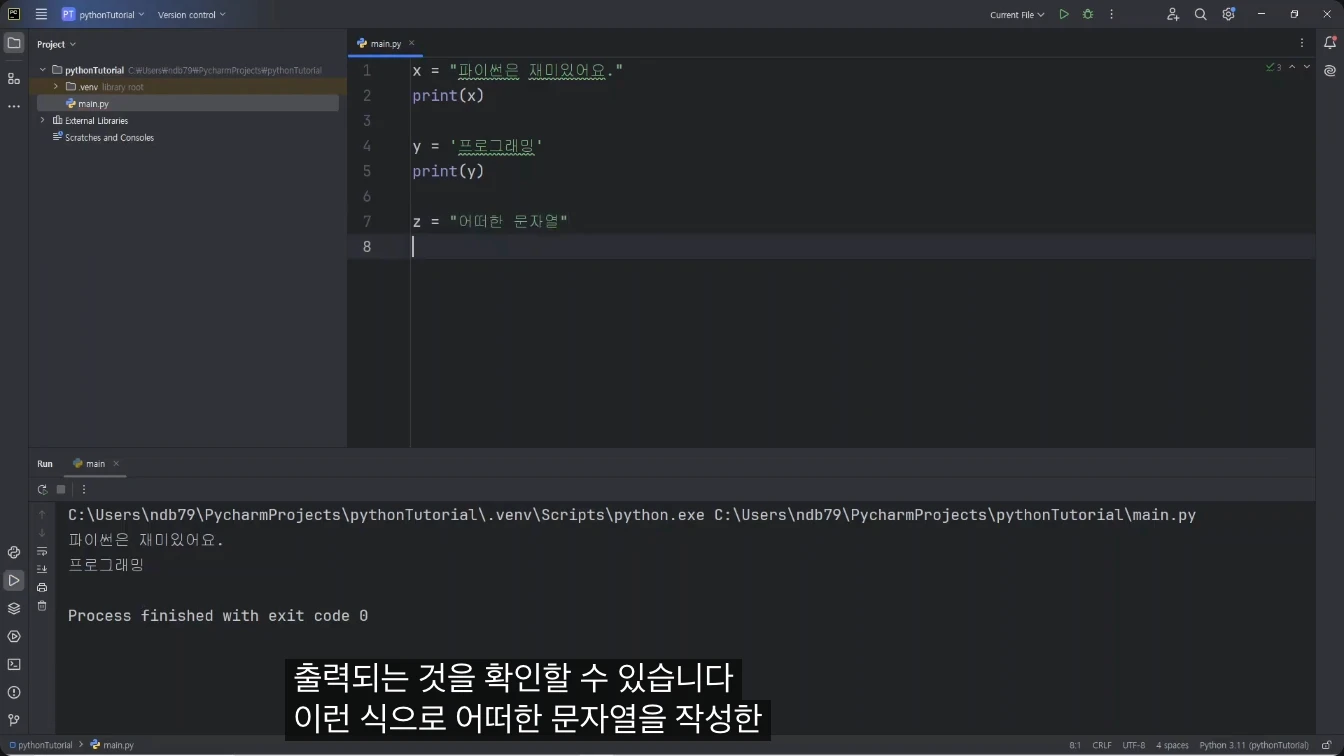
To follow along, you need a Python environment on a computer. If that is not ready, return to the installation explanation at 09:12. The video shows a 2024 PyCharm and Python setup, which may differ from the current installer. A useful first task is simply to replace an example sentence with your own and print it.
 16:32–17:25 · string outputWatch segment Meet the creatorDongbin NaMoves from environment setup to language basics in a longer lesson.The selected string example lets you compare code with the output it produces.Read creator guide
If you also use AI while studying, continue with separating an AI answer from your own understanding. It helps you ask what you can explain yourself after producing a result.
This guide compares three ways to begin and the selected segments. It does not evaluate complete courses or their employment outcomes. Screenshots retain their original language; the captions and guidance here are in English.